
The calendar
Swipe left across the board, or tap Calendar under the household name, to see the week: your calendar events and everyone’s chores together.
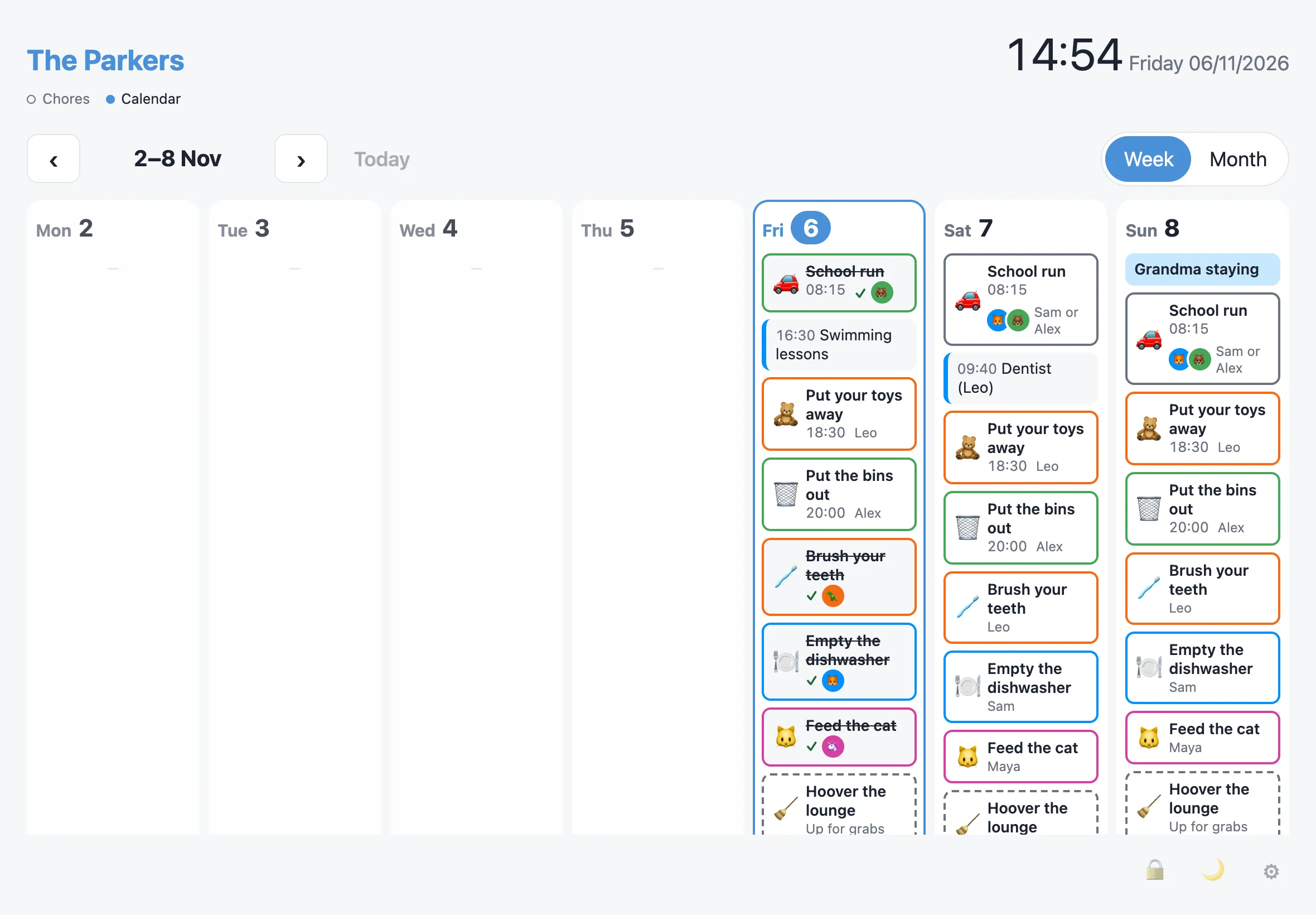
The week
Section titled “The week”Each day has a column:
- All-day events sit at the top.
- Timed events and chores follow, in time order.
- Chores are coloured by person and show their emoji. Chores anyone can claim are marked Up for grabs, and shared ones show everyone’s avatars.
- Past days show what was done (✓ and who did it) and what was missed, faded.
Use the arrows to go back up to 4 weeks, or ahead up to 3 months. Today comes back to this week.
The month
Section titled “The month”Month shows a grid with up to 3 things a day. Tap a day for the full list.
Good to know
Section titled “Good to know”- The calendar is read-only. Tapping a chore shows what it is, who it’s for, what it’s worth and how often it repeats. Chores are only ticked off from the chores view.
- Chores further ahead than the next two weeks are worked out from their schedule.
- Events come from the calendars added in Admin › Calendars. See Calendars.
- On a display, the calendar goes back to the chores after 2 minutes untouched. Change this, or turn it off, with Return to chores after in Admin › Settings.
- A locked display never shows the calendar.
- On a phone, the week is a list of days.